
Kawaii
the server is down again
oh nooo the server went sleepy (。•́︿•̀。) pls hold on a tiny bit — fixing it rn!! ✨
A menu-bar utility for macOS
Select anything you're typing, double-tap ⌥, and Recast fixes it, translates it, or reshapes it right where you are.
Free · your own AI key, or a model on your Mac
iPhone: on the App Store Download on the App Store


Selected, rewritten, copied — one panel, one keystroke.
The core loop
Highlight anything you're writing — an email, a Slack message, a pull request description — press the hotkey, and Recast opens right where you are with the selection already loaded. Watch the rewrite stream in; it's on your clipboard the moment it lands.


Templates
Fix, Formal, Dev-speak, Concise, Expand, Translate, and more — sixteen templates across four categories, each one plain instructions, not a black box. Press ⇥ and start typing to search them, or pin favorites to ⌘1–⌘9. The ones you actually reach for rise to the top on their own. Write your own with a live-test box right in the editor.
Emojicrypt is the odd one out — a reversible cipher, no AI involved. Run text through it once to encode, again to decode. Two Recast users can trade messages that read as nonsense to everyone else.
The playground
A few favorites, verbatim — each one is a single keystroke in the panel.
Kawaii
the server is down again
oh nooo the server went sleepy (。•́︿•̀。) pls hold on a tiny bit — fixing it rn!! ✨
Fix Command
gti pussh -f orgin mian
git push -f origin main
Ancient tone
brb, getting coffee
I shall briefly withdraw to procure a dark, bracing elixir.
Corporate jargon
this idea is bad
I see an opportunity to better align this proposal with our strategic priorities.
SHOUT
please read my email
PLEASE. READ. MY. EMAIL!!! 📢
Emojicrypt
meet at six
🧪🐙🌵🎈🍉🌊✨

Template market New
Meeting notes into owners and deadlines. A change description into a conventional commit. A snippet explained in plain language. Browse what other people have written, add one in a tap, and it lands in your own list — where you can read every word of it and change any of them.
Pipelines & automation New
Rewrite with AI. Run a shell macro you've saved. Or add an agent step: it proposes a command, waits for your OK, runs it, then proposes the next one — iterating until the job's done or you stop it. Chain any of the three into a pipeline, in any order.
Shrink Desktop images is the flagship agent example — it finds oversized JPEGs and PNGs on your Desktop, proposes a compression command for each one, and reports the space it saved. Skip any command you don't like, or stop the run entirely — it's your call at every step.
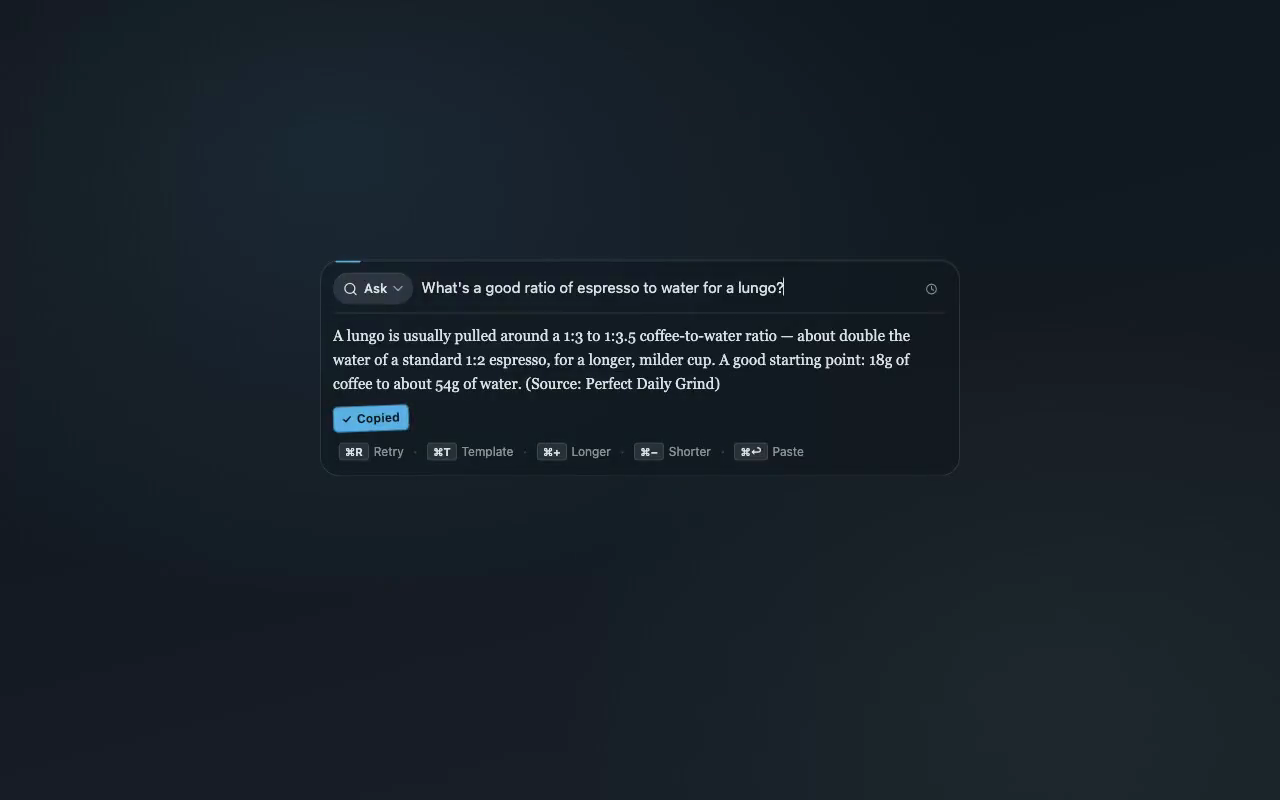
Ask anything New
It's the same core loop, aimed at a question instead of a draft: select one, press the hotkey, and get an answer right where you are — sources included whenever it had to look something up. Most questions need no lookup at all; when one does, Recast searches the web itself and shows you exactly what it searched, as it happens. It's on by default — turn off “Web search for agent steps” in Settings any time.

Any model, yours
Thirteen providers, a free Gemini tier with no card required, or point Recast at Ollama or LM Studio running on this Mac for rewrites that never leave it. API keys live in the macOS Keychain, never a plaintext config file — and nothing phones home but the update checker.
History
Press ⌘H and every recent transform is right there — what you started with, what came back, which template did it. It's saved to a local file on your Mac and nowhere else; cancelled and errored runs never make the cut.

Made to disappear
No dock icon, no window to manage — just a menu-bar glyph and a panel that opens over whatever you're doing and gets out of the way the instant you're done. Light, dark, or matched to your system, with a translucency slider that goes from airy to dense.
Questions
Yes — Recast is free to download and use. Bring your own AI key (Google Gemini has a free tier with no card required), redeem an invitation code, or run a model entirely on your Mac with Ollama or LM Studio.
Thirteen providers: OpenAI, Anthropic (Claude), Google Gemini, DeepSeek, Kimi (Moonshot), Qwen, GLM, MiniMax, OpenRouter, and any OpenAI- or Anthropic-compatible endpoint — plus fully local models through Ollama and LM Studio.
Your text goes straight from your Mac to the provider you chose — Recast has no server in between. Usage telemetry is anonymous counters only — never your text — with an off switch right in setup and Settings. API keys live in the macOS Keychain, and with a local model nothing leaves your Mac at all.
Anywhere you can select text on macOS: Mail, Slack, browsers, Word, Notes, code editors. Select, press your hotkey (double-tap ⌥ by default), and the rewrite streams in right where you are — ⌘↩ pastes it back over your selection.
A Mac with Apple Silicon (M1 or newer). No account, no subscription — download the DMG, drag it to Applications, and connect a model in the two-minute setup.
Privacy
